Workstate's search stack: Postgres, pgvector and Voyage, with no search cluster
Workstate is a shared memory and decision record for people and their AI agents. It indexes a team’s code, documents and tickets, and keeps a ledger of decisions and incidents that agents search before they act and write to when they finish. Agents reach it over MCP (Model Context Protocol), an open standard for connecting AI tools to outside services.
Our first prototype ran on a single consumer-grade GPU. This post is about what Workstate will run on in production, and why we chose one Postgres database over a search cluster. It’s a design: we haven’t built the production version yet.
What a search has to do
A search takes a question from an agent and returns the few passages most likely to answer it, from that team’s data and nobody else’s.
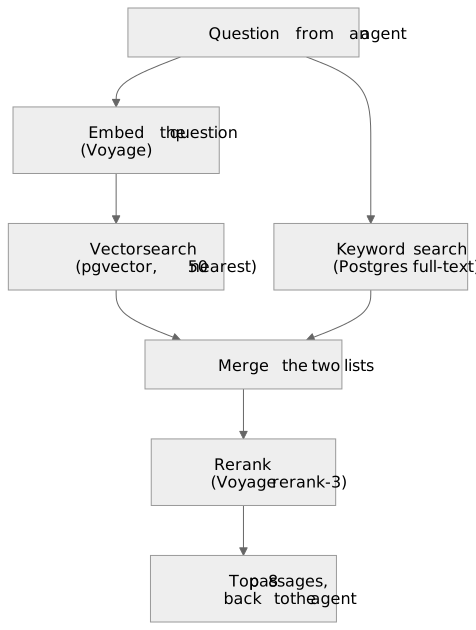
Four stages do the work:
- An embedding model turns text into a vector, a list of 1,024 numbers, so that passages with similar meaning end up close together. Every chunk of code or text is embedded once, when it’s indexed. Every search embeds the question.
- The vector search finds the 50 stored chunks nearest the question’s vector. It’s fast, but approximate.
- A keyword search runs alongside it, because embeddings are bad at exact names. More on that below.
- A reranker reads the question next to each candidate and scores how well each one answers it. It’s slower and much more precise, and it’s why the top 8 are usually the right ones.
The reranker can only reorder what the first stages found. A passage they miss never reaches the agent, and the agent never knows it was there. So the embedding model sets the ceiling.
Everything is scoped to a namespace, the unit that separates one team’s data from another’s.
The prototype
Our first prototype ran open models on one consumer-grade GPU: Qwen3-Embedding (8 billion parameters) for embeddings and bge-reranker-v2-m3 for reranking. Vectors lived in Qdrant, a dedicated vector database, and accounts, sources and the ledger lived in Postgres. It proved the idea, but it couldn’t carry over to production:
- Throughput. The GPU embedded about 130 chunks a minute. The 193,000 chunks we tested with took about a day to index, so a thousand customers that size would keep it busy for nearly three years.
- Two stores to keep in step. The ledger lived in Postgres and its vectors in Qdrant, with a reconcile job keeping the two in step. Two stores are two places to get it wrong: one bug had the code sync deleting some ledger vectors on every run, and the reconcile job quietly embedding them again.
- One machine, with no failover.
What we weighed
Price was one of four questions, and not the one that decided it:
- Enterprise adoption. A customer’s security team reviews every company that holds their data, and Workstate holds their code. Our production stack is on AWS, so a store inside our AWS account adds no one new to that review, while a store run by another company adds one. The technology matters too: Postgres is a database enterprise teams already know how to assess, and RDS supports the encryption at rest, audit logging and point-in-time restore that reviewers expect.
- Cohesion. How well each option fits the tools we already use. Workstate’s accounts, sources and ledger already live in Postgres. A store that is Postgres means one schema, one backup, one access model and one set of dashboards. A store beside it means two of each, plus code to keep them in step.
- Operations. Who patches it, backs it up and fails it over. We’d rather a managed service did, so the team spends its time on the product.
- Cost, at our size.
Most of the search quality comes from the models, and they’re the same in every option: Voyage’s, called directly or, in Atlas, through MongoDB. What changes is where the vectors live. We sized each option against a corpus like our prototype’s test data: about 193,000 chunks, roughly 100 million tokens, stored as 1,024-number vectors in about 1.5 GB. Prices are list prices as of October 2026, and the table says which figures are estimates.
| Option | Per month | Customer data stored | Fit with our tools |
|---|---|---|---|
| Qdrant Cloud | ~$30–115 for a 2 GB node (outside estimates: Qdrant doesn’t publish its rates) | At Qdrant | A second database next to Postgres |
| MongoDB Atlas, which owns Voyage | ~$57 (M10) to ~$146 (M20), with embedding and reranking built in | At MongoDB | A second database, and Postgres stays for the app |
| Qdrant on an EC2 instance (an AWS virtual machine) | ~$25–35 (approximate) | In our AWS account | A second database that we patch, back up and fail over ourselves |
| Amazon OpenSearch Service | ~$90+ for instances, ~$175+ for Serverless (approximate) | In our AWS account | A search cluster to run beside Postgres |
| S3 Vectors, vector storage in Amazon S3 | Under $1 | In our AWS account | A second store, with no transactions and about 100 ms per query |
| Postgres + pgvector on RDS | $0–50 on top of the Postgres we need anyway | In our AWS account | The same database as the app and the ledger |
The models cost the same whichever store holds the vectors. Embedding 100 million tokens costs $12
with voyage-4-large and $2 with voyage-4-lite. That’s once per customer, plus small top-ups as
their content changes, and Voyage gives each account its first 200 million tokens free for each
model. Each search costs about a tenth of a cent, almost all of it reranking: 50 candidates come to
about 20,000 tokens. On cost alone, S3 Vectors would have won. Enterprise adoption and cohesion
pointed at Postgres.
The decision
- One database. An Amazon RDS (Relational Database Service) for PostgreSQL instance holds everything: accounts, sources, keys, the ledger, and the vectors, through the pgvector extension, which adds vector types and indexes to Postgres.
- Voyage for the models:
voyage-4-largefor paid plans,voyage-4-litefor free ones, andrerank-3for reranking. - No search cluster: no OpenSearch, no Elasticsearch, no Qdrant.
Against the four questions:
- Enterprise adoption. Customer data stays in our AWS account, in a database security teams already know how to assess. The one company the design adds to a security review is Voyage, and What we gave up covers that.
- Cohesion. One database holds the app’s data, the ledger and the vectors: one backup, one set of credentials, one access model. A ledger entry and its vectors commit in the same transaction, so they can’t drift apart, and the reconcile job goes away. Keyword search comes from the same database: embeddings are bad at exact names, such as a class name, a config key or a line from a stack trace, and Postgres full-text search is good at them.
- Operations. RDS handles patching and backups, and Multi-AZ (a standby in a second availability zone) handles failover.
- Cost. Only S3 Vectors is cheaper, and it would bring back a second store, with no transactions and about 100 ms a query.
Why not Amazon’s own models?
Amazon Bedrock has its own embedding model, Titan Text Embeddings V2, at $0.02 per million tokens:
the same price as voyage-4-lite. It would keep the models inside AWS too, which would make
enterprise reviews simpler. We chose Voyage anyway, for quality and cohesion. Titan has no separate
mode for questions and documents, which Voyage’s models use to tune each embedding for its side of
the search. And Titan’s vectors can’t share an index with any other model, while Voyage’s 4 series
puts its large, lite and nano models in one embedding space. Free plans, paid plans and an outage
fallback can all share one index. Reranking isn’t cheaper on Bedrock either: Cohere Rerank 3.5 costs
about $0.002 a search, twice Voyage’s.
Making pgvector work for many teams
We haven’t built this storage layer yet. The schema below is the plan:
CREATE EXTENSION IF NOT EXISTS vector;

CREATE TABLE chunks (
  id          uuid PRIMARY KEY,          -- stable for (namespace, path, chunk_index)
  namespace   text NOT NULL,
  source_id   uuid,
  repo        text NOT NULL,
  path        text NOT NULL,
  chunk_index int  NOT NULL,
  body        text NOT NULL,
  embed_model text NOT NULL,             -- which model made the vector
  embedding   halfvec(1024) NOT NULL,    -- 16-bit floats: half the memory
  search      tsvector GENERATED ALWAYS AS (to_tsvector('simple', body)) STORED
);

CREATE INDEX chunks_embedding ON chunks USING hnsw (embedding halfvec_cosine_ops);
CREATE INDEX chunks_search    ON chunks USING gin (search);
CREATE INDEX chunks_scope     ON chunks (namespace, repo);
And the vector half of a search:
SET hnsw.ef_search = 100;                 -- candidates per pass; the default, 40, is fewer than we want
SET hnsw.iterative_scan = relaxed_order;  -- keep scanning until enough rows pass the filter

SELECT id, path, body
FROM chunks
WHERE namespace = $1
ORDER BY embedding <=> $2::halfvec        -- cosine distance to the question's vector
LIMIT 50;                                 -- possibly a little out of order: the reranker sorts them
What makes this work for many teams in one table:
- Filtering. HNSW (Hierarchical Navigable Small World) is the graph index pgvector uses for fast
nearest-neighbour search. It finds the nearest vectors across all teams, and the
WHEREclause then drops the other teams’ rows. With many teams, too few survive. pgvector 0.8 fixes this with iterative scans: it keeps reading the index until 50 rows pass the filter, up to a limit you can set. RDS has supported pgvector 0.8.0 since November 2024. If filtering still costs too much, the table can be partitioned by namespace, so each search walks only its own team’s index. - Memory.
halfvecstores each number in 16 bits, so a vector takes 2 KB instead of 4 KB. HNSW indexes onhalfvecwork up to 4,000 dimensions, far above our 1,024. - Hybrid search. The keyword search runs alongside the vector search, and the two lists are merged with reciprocal rank fusion: each passage scores the sum of 1 ÷ (60 + its rank) across the lists it appears in. The reranker then orders the merged candidates.
- Isolation. In the code, a query can’t be built without a namespace: it’s a required, typed argument, which is how our current code already works. Postgres row-level security can add a second wall in the database itself.
Free and paid plans on different models
Vectors are a model’s output. There’s no converting voyage-4-lite vectors into voyage-4-large
ones: the only way to get large-model vectors is to embed the text again with the large model. What
makes plans cheap anyway is that the Voyage 4 models
share one embedding space. In Voyage’s words, “All
embeddings created with the 4 series are compatible with each other.” So one namespace can hold a mix
of both.
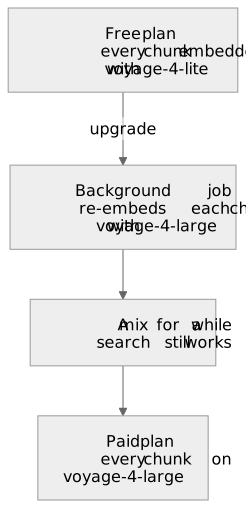
- Free plans embed with
voyage-4-lite, at $0.02 per million tokens. - Paid plans embed with
voyage-4-large, at $0.12 per million tokens. - On upgrade, a background job re-embeds the namespace’s chunks with the large model and overwrites each one in place. Search keeps working throughout and gets better as the job runs. For an organisation the size of ours that costs $2–4, and for a 100-million-token corpus $12.
- On downgrade, nothing happens. The large-model vectors stay, and new content is embedded with lite.
The embed_model column is what lets the job find the chunks still on lite. Reranking can follow the
plan too, with rerank-3-lite for free and rerank-3 for paid, and that needs no re-indexing at all.
Two rules keep this safe. Every model writes vectors of the same size, 1,024 numbers. And models only ever mix within the Voyage 4 family. Vectors from different families, say Voyage and Titan, don’t cause an error when mixed: search just returns worse results, with nothing to notice. Our current code already guards against this, by refusing writes from any model but the one that built the index. The new store keeps that guard, widened to the Voyage 4 family at 1,024 dimensions and no further.
How much worse is lite? Across the 29 datasets in Voyage’s general retrieval benchmark, large beats lite by 4.8% on average, scored by NDCG@10 (normalised discounted cumulative gain at 10, a standard score for how well the top 10 results are ordered). Reranking should narrow the gap, since it reorders whatever the first stage finds, but we’ll measure that on our own data rather than assume it.
When Voyage is down
Every search embeds its question through Voyage’s API, so if the API is down, search is down.
The fix is voyage-4-nano, which Voyage released as
open weights under the Apache 2.0 licence. It has about 340 million parameters and shares the larger
models’ embedding space. It can run inside our own search service and embed questions when the API
fails. Or it can embed every question, which saves a network round trip on each search: Voyage’s own
advice is to embed documents once with the large model and queries with a smaller one. How fast it
runs without a GPU is still to be measured.
If reranking fails, search will fall back to vector order and say so in the response: worse results, but still results.
What we gave up
- Customer code goes to Voyage, for embedding and reranking. That makes Voyage a sub-processor:
the one company this design adds to a customer’s security review. Voyage also sells its models,
such as
voyage-4, on AWS Marketplace as Amazon SageMaker models priced per instance hour. That could keep embedding inside AWS for a customer who needs it, but we haven’t tried it yet. - A single Postgres scales less far than a dedicated vector store. Search and the app also share one database, so heavy search load would slow the app. A read replica for search is the first fix. After that come partitioning, or moving the vectors out to S3 Vectors.
- The prices are list prices from October 2026. The Qdrant and OpenSearch figures and some of the AWS ones are estimates.
What’s next
- Build the pgvector storage layer.
- Run our own retrieval test: the same questions through the same reranker, with
voyage-4-large,voyage-4-lite,voyage-code-4,voyage-4-nanoand Amazon Titan. It measures how often the right file is among the 50 candidates, and how often it’s in the top 8 after reranking. The test already exists: on the prototype, search put the right file in the top 10 for 71% of 28 test questions, against 57% for grep patterns written by someone who already knew the answer. One result would change the plan: Voyage doesn’t say whethervoyage-code-4shares the 4 series’ embedding space, so if it wins on code, free and paid plans might not be able to share an index. - Measure the real token counts on the first production index. Voyage reports them with every request.
Then a follow-up post with the numbers.
Sources
- Voyage AI pricing
- Voyage embedding models
- The Voyage 4 model family
- voyage-4-nano on Hugging Face
- voyage-4 on AWS Marketplace
- pgvector
- Amazon RDS for PostgreSQL supports pgvector 0.8.0
- MongoDB Atlas retrieval announcement, August 2026
- MongoDB Atlas pricing
- Qdrant pricing
- S3 Vectors limits
- Amazon S3 pricing
- Amazon Bedrock pricing